

S1L Website
Image and Design
Graphics and Images
Subject:
In Their New Home
These images will depict Orange backgrounds with the full color subject of the images in the center. These images are multicultural to give a representation of all demographics. This contrast will add a focus on the subject of the images, and leave a warm, S1L branded feeling.
Subject:
Object Focused
These images are focused more on the subject of the section instead of the feeling of owning a home. All these images will have a topic that can be colored and a background that will be Orange.
Subject:
Branded Images
Graphic images that have branding with logos and color will be used on this type of
Subject:
Home and Living
Due to the color Orange color and it’s association with fire, the Orange background graphics will never be used for home front photos. These can non-graphic photos can use graphic overlays that I’ve copied from our Marketing Teams social content into coded vector layers that will give a 3d texture to the site. See the examples below
Marketing Graphics
Designs inspired by the S1L Marketing Team
These photography and graphic combination designs will be implemented into the website, with all the graphics being separated svg graphics overlayed over the jpg photos. This enables the images to have Ken Burns-esue parralax effects.
Bottom Waves
2022 Social Ads and Email Campaigns which have a wave at the bottom of photos:

Background Dots
2022 Social Ads and Email Campaigns which have a Orange dots in the background:


Triangles
2022 Social Ads and Email Campaigns which have 3 layered triangle graphic:
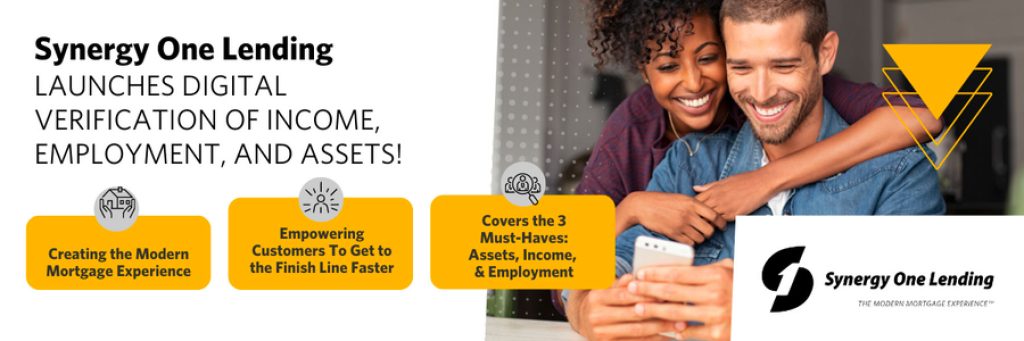

Side Triangles
2022 Social Ads and Email Campaigns which have a wave at the bottom of photos:
Build Equity
BY BECOMING A
homeowner

We Make
Mortgages Easy
Get your home in just a few simple steps
Lorem ipsum dolor sit amet, consectetur adipiscing elit, sed do eiusmod tempor incididunt ut labore et dolore magna aliqua. Excepteur sint occaecat cupidatat non proident, sunt in culpa qui officia deserunt mollit anim id est laborum.
Icons
S1L Branded Iconography
The Basics





The Home





The Loan





The Tech





S1L Web Branding
Responsive typography branding
Synergy One Typography has been designed to be easy on the eyes. With contrast thats readable, clear and a pleasure to read. Messages should never be an obstacle for a user to read, digest, and understand.
Brand Colors
In Hex-Code Values
The typography colors have been arranged into 2 groups which have brightness and tone variations.
Blacks
We have 3 variations of Black. Two tones of Off Black, which is good to reduce eye strain cause by heavy contrast, and a Pitch Black, to make the text pop out, when necessary.
500
#393939
#393939
#393939
#393939
700
#282828
#282828
#282828
#282828
900
#000000
#000000
#000000
#000000
Whites
We have 3 variations of White. Two tones of Off White, which is good to reduce eye strain cause by heavy contrast, and a Pure White, to make the text pop out, when necessary.
50
#FFFFFF
#FFFFFF
#FFFFFF
#FFFFFF
300
#FBFAF6
#FBFAF6
#FBFAF6
#FBFAF6
500
#F8F6F6
#F8F6F6
#F8F6F6
#F8F6F6
Colors With Fonts
For Links, the Primary Colors are used to signify that it may be clicked on. Also, S1l.com uses the other Accent Colors for website Links. Particularly for form text, which displays on Errors, Success, and Warning text on the forms.Last we have the standard shades of Grey as well.
Primary
The Primary Colors are used on all the interactive elements, CTA’s, links, inputs, active states, etc.
50
#FFDF4F
#FFDF4F
#FFDF4F
#FFDF4F
300
#FFD447
#FFD447
#FFD447
#FFD447
500
#FFC207
#FFC207
#FFC207
#FFC207
700
#EAB310
#EAB310
#EAB310
#EAB310
900
#D39F24
#D39F24
#D39F24
#D39F24
Accent A Design
The Accent A Color is used alongside the Primary to give a calming cool sensation that creates the perfect balance with Orange
50
#A8E6FF
#A8E6FF
#A8E6FF
#A8E6FF
300
#70D5FF
#70D5FF
#70D5FF
#70D5FF
500
#14BAFF
#14BAFF
#14BAFF
#14BAFF
700
#009BDB
#009BDB
#009BDB
#009BDB
900
#007AAC
#007AAC
#007AAC
#007AAC
Accent B
Sucess
This Secondary Accent Color is also used alongside the Primary to indicate to the user that the element is a secondary focus
50
#1AE7E0
#1AE7E0
#1AE7E0
#1AE7E0
300
#01D5CE
#01D5CE
#70D5FF
#70D5FF
500
#00B5AF
#00B5AF
#00B5AF
#00B5AF
700
#018F8A
#018F8A
#018F8A
#018F8A
900
#006C68
#006C68
#006C68
#006C68
Accent C
Warning
These colors depict an emotion of attention, generally gain attention or for warning text in a form field
50
#FFCD36
#FFCD36
#FFCD36
#FFCD36
300
#FFB833
#FFB833
#FFB833
#FFB833
500
#F8971F
#F8971F
#F8971F
#F8971F
700
#E87C00
#E87C00
#E87C00
#E87C00
900
#D46A00
#D46A00
#D46A00
#D46A00
Accent C Error
These colors depict an emotion of negativity, generally used across error states for form fields
50
#ED2000
#ED2000
#ED2000
#ED2000
300
#DA281D
#DA281D
#DA281D
#DA281D
500
#C20C00
#C20C00
#C20C00
#C20C00
700
#A40A00
#A40A00
#A40A00
#A40A00
900
#7D0700
#7D0700
#7D0700
#7D0700
Neutral
These colors are used for text colors, , backgrounds,, separators, modals, etc.
50
#F4F4F4
#F4F4F4
#F4F4F4
#F4F4F4
100
#ECECEC
#ECECEC
#ECECEC
#ECECEC
200
#D9D9D9
#D9D9D9
#D9D9D9
#D9D9D9
300
#C0C0C0
#C0C0C0
#C0C0C0
#C0C0C0
400
#A9A9A9
#A9A9A9
#A9A9A9
#A9A9A9
500
#8E8E8E
#8E8E8E
#8E8E8E
#8E8E8E
600
#7C7C7C
#7C7C7C
#7C7C7C
#7C7C7C
700
#5F5F5F
#5F5F5F
#5F5F5F
#5F5F5F
800
#323232
#323232
#323232
#323232
900
#121212
#121212
#121212
#121212
